by Cathy Gilmore | Jul 11, 2017 | Features
Every family has at least one. No, not the crazy uncle. We’re talking about the record-keepers. You know, the ones that ended up with all the stuff: the family bible, the old photos, the diaries and letters. Some people spend a lifetime gathering records, hoarding photos, and hunting down lost items. Others come upon records by accident or inheritance. If you’re a record keeper, chances are you’ve thought a lot about what to do with your family records. You may not know it, but you’re an archivist.

What’s in Your Closet?
Like professional archivists, your goal is to collect, preserve, and share things—in your case, family records. Among the challenges professional archivists face when building a digital repository is making their collections discoverable, accessible, and searchable to their patrons. Family archives share these same challenges. For record-keepers of family photos, journals, letters, and other precious memorabilia, we should think like an archivist and ask ourselves the following three questions about our family records.
1. Are they discoverable?
Do your relatives and researchers know your family records exist? If not, how would they discover them? If your records are not “born digital” and are still in their original state as paper letters, journals, and other documents, it’s nearly impossible for others to discover your records. If your records are digitized, where are they stored? For example, the storage options below have varying levels of discoverability.
- Cloud storage, like Google Drive, One Drive, Dropbox
- Physical storage, like computers, external hard drives, USB, CDs, etc.
- Online family tree databases, like FamilySearch, MyHeritage, and Ancestry
- Historical or genealogical archives
While some may think “I don’t want my records to be discovered,” remember that discoverability does not preclude archive owners from establishing rules of access and usage. For example, record owners may wish to be selective with record sharing, charge for record access, or enable rules and limitations on the use of the record. No matter what rules we have in place, discoverability remains the fundamental first step in creating a family archive. Without it, our records are lost to the world.
2. Are they accessible?
Once records are discovered, can relatives and researchers access them? There are many instances where records may be discoverable, but not accessible. For example:
- You discover records online, but they are in a private family tree you can’t gain access to
- You discover that a record in an archive, but it can only be accessed by visiting the archive
- You discover a record in an archive, but learn that access is limited to certain people
- Everyone knows Aunt Sue has the family Bible, but she won’t show it to anyone
- Your relative has the family photo collection on his external hard drive, but you can’t get a copy
As a record-keeper and family archivist, an important role is to enable accessibility to family records. If you don’t do it, who will?
3. Are they searchable?
Are your family records currently searchable? How easily are they sorted, searched, and read? What elements of your records are searchable (file names, titles, descriptions, etc.)? How does your software, cloud storage, or family tree database facilitate searchability? As a companion question, can your records (and all of their associated data) connect with other databases, family trees, and archives? Furthermore, can your record data be downloaded, manipulated, and applied in other ways, like timelines, maps, and books? When choosing where to place your family records, remember that full searchability is key to an archive that is engaging, connectable, and readable.
 A Kindex Solution
These are the kinds of questions we think about every day. We help family archivists rescue their records, bring them out of obscurity, and create archives that can be discovered, accessed and shared. With Kindex you can:
- Enable your archive to be discovered by potential collaborators and contributors
- Access your archive from any computer, anywhere.
- Unite scattered family records, make hard-to-find collections accessible to your members, and create public or private networks to collaborate on your archive
- Create searchable record data in three ways (metadata, full text transcription, and tags)
- Download your archive data (as CSV) any time.
In addition, we have some amazing features presently in development that will help your archive to connect and be shared with other people in various formats.
SAY NO MORE. LET’S DO THIS!
Still undecided? Here are some bonus questions:
|
Where is your Archive?
|
|
Undigitized |
On your computer |
In cloud |
In a digital family tree |
On Kindex |
| Do I control my archive access, scope, and content? |
Yes |
Yes |
Yes |
Varies (private vs. wiki-based) |
Yes |
| Is my archive discoverable online? |
No |
Limited |
Limited |
Varies (private vs. wiki-based) |
Yes |
| Is my archive accessible from any computer? |
No |
Very limited |
Varies |
Varies |
Yes |
| Can others collaborate on my archive |
No |
No or very limited |
Yes; limited |
Varies |
Yes |
| Can my archive be private? |
Yes |
Yes |
Varies |
Varies |
Yes; Choose your privacy level |
| Is my archive fully searchable? |
No |
Limited |
Limited |
Limited |
Yes* |
| Can I add metadata? |
Yes |
Varies |
Varies |
Limited |
Yes |
| Can I add metadata in batch form? |
No |
No |
No |
No |
Yes |
| Does my archive have integrated transcription & record tagging tools? |
No |
Varies; often separate from primary source |
Rare; Varies by platform |
Rare; Varies by platform |
Yes |
| Can I download all my archive data? |
No |
No |
No |
No |
Yes |
| Is my archive compatible with other databases? |
No |
Varies |
Varies |
Varies |
FamilySearch (others forthcoming) |
*some metadata searchability in development
Archive Your Life on Kindex
Don’t you think it’s time you started thinking like an archivist? Kindex is free to try, so head over to Kindex.org and get started. Click “Try it Out” to start your free archive up to 50 records. Upgrade to unlimited records (and unlimited collaborators!) for about $12/month.
TRY IT OUT!


by Cathy Gilmore | Mar 28, 2017 | Features, Resources
A few weeks ago I was browsing in an antique shop when a stack of old photos caught my eye. As I examined these portraits and family poses one by one, I discovered names written on the back: David A. Page. Teddy O. Keefer. Ester Olson. How did they get lost?

Photo 0020 on found.kindex.org is David Alonzo Page with wife Gilheld “Nellie” Qualseth and children Gladys and Elmer, c1900.
As a self-proclaimed hoarder of my own family records, I couldn’t imagine letting go photos like these. And yet it happens every day. Parents pass away, downsize, or move, and family records are lost or thrown away. Records that do remain are often sold in estate sales, eventually finding their way to antique stores or flea markets where they sold as mere commodities.
Kindex wants to change that. While we are doing all we can to rescue records before they are lost, we created the Kindex Lost & Found Archive as a home for records without families to claim them. Found.kindex.org is a destination where collectors, volunteers, researchers, and family members can work together to rescue our histories by preserving, indexing, and discovering lost family records. There are many ways you can be a rescuer—and you don’t have to own any records to get started.
Rescue by Indexing
Rescue history by transcribing photos, postcards, and other records rich with information. Indexing on found.kindex.org creates a new repository of names, dates, and locations that make thousands of records searchable for the first time. All you need to get started is a free Kindex account and a generous heart.
How to index records Kindex Lost & Found Archive.


Postcard 0016 on found.kindex.org
Rescue by Collaborating
Become a collaborator on found.kindex.org and you can add your own collections of “lost” records to be crowdsource indexed. To become a collaborator, contact us for an invite or go to found.kindex.org and click Add a Record.

Rescue by Partnering
If you are an antique collector or dealer you can help rescue history by partnering with Kindex and sharing your records on found.kindex.org. We have partnered with some great local antique shops, including Longwood Antiques and Cobwebs Antiques & Collectibles, who have agreed to allow Kindex to scan photos, postcards, scrapbooks, and other indexable records. We, in turn, have agreed to host them in a crowdsourced indexing archive where the records can be searched for and found by their names, descriptions, keywords, and other metadata—all at no cost to them. Records are attributed to the store they came from, so when they are found, researchers can contact the store owner to inquire about the records.

Who is the cute & mysterious gas station attendant my mother met on the road to Las Vegas in 1959? We’ll learn soon on found.kindex.org.
What’s the Catch?
There’s no catch—just do have a few guidelines:
- Records added to this archive must have some sort of indexable text that would identify the record to an individual or group.
- Collaborators who add records to Kindex archives retain copyright ownership. By adding records to Kindex, you are grant Kindex a license to host and create a derivative (i.e., an index) of your records.
- Record owners may watermark their images so much as the watermark does not detract from or obscure any part of the record.
- You must follow all Kindex Terms & Conditions. You have an opportunity to review them when you create a free Kindex account.
- To index records as a guest, or to add records as an archive collaborator, you must have a Kindex account.
Please contact us with an questions you may have, and happy finding!
SIGN UP

by Cathy Gilmore | Mar 28, 2017 | Featured Archive, Resources, Software
Thanks for being amazing and indexing on found.kindex.org! See the instructions below for indexing records on the Kindex Lost & Found Archive. For a general overview and instructions, see links below.
Getting Started on Lost & Found
SIGN UP
- If you haven’t already, sign up for a Kindex account.
- Note when you sign up on Kindex, you receive your own free archive (up to 50 records) with a custom subdomain.
- After you sign up, navigate to found.kindex.org and choose a record to index.
Note: If you are a collaborator on this archive, you will see the “found” archive in your archives list.
- A purple checkmark means the record has already been indexed, and “transcribe” means it’s ready to be indexed!
Indexing photos
Transcribe & Describe
All photos in found.kindex.org should have some indexable text. Sometimes the text is written on or around the photo, and sometimes it is written on the back. If you need to add any of your own comments or clarification in the transcription, please include it within double brackets [[ ]].
- Type what you see. As with any transcription project, type what you see. Don’t correct spelling, expand abbreviations, or add anything that’s not there (except when using brackets [[ ]] if needed).
- Index a description of the photo. If there is no text on the photo itself, add a description that will help it be more searchable. Add an image description by clicking on the image tool above the transcription window. A numbered image box will appear where you can add your description.

Add an image description by clicking on the image tool above the transcription window.
- Photo captions or descriptions. Add the photo caption or description. If it’s on the next page, be sure to add a page break.

- Studio mark. If there is a studio mark, be sure to include it.

- If you are finished with your transcription, click Submit. Otherwise, click Save for Later.
Tagging & Adding Metadata
After you do the transcription you will go to the Tag step. Here you can additional information that can help this record be sorted and found.
Note: this step is optional. It is not necessary to fill out any or all of this information. To skip or complete this step, click Submit.

Indexing Postcards
The same guidelines apply when indexing postcards.
Postcard 0016 on found.kindex.org
Note that postcards have additional areas of information, such as postmarks, and captions to images. Because Kindex does not yet have unique indexing fields for each type of data being transcribed, it is helpful to indicate within double brackets [[ ]] the type of information indexed, as shown below:

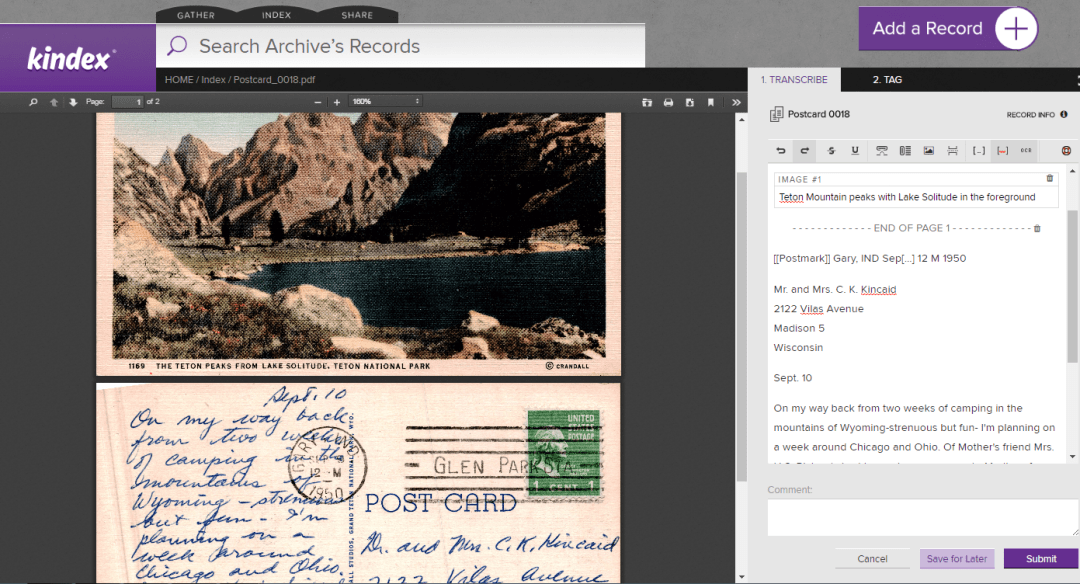
For Record Owners & Collaborators
If you have been invited to be a collaborator on an archive, you will be able to add records to that archive to be indexed. Please note the following:
- Records added to this archive must have some sort of indexable text that would identify the record to an individual or group.
- Collaborators who add records to Kindex archives retain copyright ownership. By adding records to Kindex, you are grant Kindex a license to host and create a derivative (i.e., an index) of your records.
- Record owners may watermark their images so much as the watermark does not detract from or obscure any part of the record.
- You must follow all Kindex Terms & Conditions. (You have an opportunity to review them when you create a free Kindex account.)
- Kindex has the right to remove records that don’t comply with terms and conditions.
Important: As of 03.28.2017, you can only add one record at a time, but batch upload capabilities are set to be released by April 7th. This tool will also enable you to batch assign Record information such as descriptions and provenance.
Thank you for being a record rescuer!
SIGN UP
by Cathy Gilmore | Feb 5, 2016 | Features, Resources, RootsTech 2016, Software
Update 22 February 2016:
At this stage our software has limited functionality, but we are still on schedule for a Beta test launch the beginning of March. Among other things, you will see more options for uploading records, increased functionality with the transcription and tagging tools, as well as more robust sharing features. If you are interested in beta testing, please contact us at sales @ kindex dot org.
_______________________________
Kindex Beta just became available on 3 February 2016 for any users to try it out. Here are some important FAQs that will provide our current status and future functionality.
How do I create an account?
For Beta, we are requiring a FamilySearch login. For most (but not all) account types, this will remain a requirement so Kindex and FamilySearch may support one another in indexing Memories and ensuring that there is little or no name duplication in the Kindex Archive. Indexing accounts that are custom or research-orientated will not necessarily require a FamilySearch login.
I pressed the “Try It Out” button and all I see are a bunch of random files.
The “Try it Out” feature is there to demonstrate the Memory import capability and is not associated with your user account.
Can I upload records directly to Kindex?
For this Beta release, records you wish to index must already be added to FamilySearch Memories. To bring those records into Kindex, add the FamilySearch person ID linked to those Memories under the Add person section on the left of the Gather Screen.
When can I add Kindex Records as FamilySearch Memories?
When direct Kindex record uploads become available, the ability to save these records as FamilySearch Memories will follow soon after.
My FamilySearch Memories are all in the same location.
We are currently trying to ensure that record types are placed in the appropriate category in the Gather screen. For example, Family Search Memories that are photos should go directly to the Kindex Photos area. Look for that functionality to improve.
Can I tag people, places and events?
Our tagging feature will become available in the coming days and weeks.
I have records that I want to index, but I don’t want them to be available to the public.
Kindex will offer two types of privacy tools. First, the document contributer designates a record public or private a the document upload. We will also have a redaction tool for certain words or pages you wish to remain private. For example, you may have a journal that contains sensitive information. You may make that journal private and redact the sensitive information during indexing. Then, if you wish you may change the privacy setting to public.
My indexing screen looks the same for photos, letters, or other document types.
In the coming days and weeks, we will add modals that will assign specific document types for Kindex records. These document types will determine what fields are available on the indexing screen.
When will Kindex Family accounts be available?
Subscription KindexFamily and MyFamily accounts will be ready in March. MyKindex accounts will be free during Kindex Beta.
I want to become a Kindex Beta tester. What do I do?
That’s fantastic! Following RootsTech 2016, we will contact all Beta Testers with instructions.
When will your Community Indexing page be available?
We love our volunteer indexers! Kindex will provide records to the indexing community that volunteers may index and review. Also, we are exploring “indexing credits” whereby community indexers may receive free or discounted Kindex subscriptions by indexing our public records.
How will I know Kindex will be around in five years? I don’t want to lose all my work.
Kindex is solidly supported, backed, and funded. We are also FamilySearch Certified. Part of this means that your source records will be saved and backed up to the FamilySearch Memory archive. You also own all of your indexed content that you will be able to download in various formats such as HTML, text, and print.
I’m a researcher, historian, business historian or museum owner. Can we use Kindex for non-family records?
Yes! Kindex is the idea tool for for transcribing and tagging any primary source documents or records in either a public or private archive.

by Cathy Gilmore | Jan 30, 2016 | RootsTech 2016, Software
RootsTech 2016 has selected Kindex™ LLC of Kaysville, Utah, from a field of nearly 50 candidates to present their family history software in the semifinal round of the Innovator Showdown on February 3, 2016. Part of the RootsTech Innovator Summit, the Innovator Showdown features the latest in family history technology and innovation. From the field of twelve semifinalists, a judges panel will select six finalists to demo live onstage for over 23,000 people. Winners take home a piece of the $100,000 prize in cash and in-kind services, not to mention the free publicity that comes with being a finalist.
Kindex owners and cousins Kimball Clark and Cathy Gilmore are thrilled about the prospects of their new company. “RootsTech has been fantastic at encouraging new technologies in the family history field,” said Kimball. “The Innovator Summit is a wonderful forum for us to present our ideas and learn from others. We are excited for the opportunity RootsTech provides startups like us.”
For Cathy and Kimball, what started as a project to scan and archive their grandmother’s diaries, letters, photos, and other documents evolved into developing a web software company that solved the problem of accessing and reading old documents through indexing. “We realized that scanning documents and throwing them on a website just wasn’t enough,” Cathy explained. “We had difficulty reading the handwritten letters and navigating through so many files. Why not apply the FamilySearch Indexing model to families?”

Kindex Beta debuts at RootsTech 2016
“Indexing has been immensely popular in fueling the find for millions of researchers,” Cathy continued. “Why not extend indexing to the millions of family records that are rich with people, places, and events. These records are at risk of being lost or discarded, and within them are the stories we all seek.”
“One of the most exciting parts of Kindex is the idea that not only will our family benefit, but that countless people mentioned within others’ indexed records will have new documents attached to them through our tagging and transcription tools,” Kimball said. “For them, we are rewriting their history.”
The RootsTech Innovator Summit is a one-day event for developers, entrepreneurs, and innovators from around the globe to explore, examine, and discover business and technological opportunities within the family history industry. The Innovator Summit is just one of the events offered at RootsTech, the largest family history even in the world. From Feb. 3-6 in Salt Lake City, Utah, RootsTech will offers speakers, entertainment, classes, and large Expo Hall of exhibitors.
Along with being an semifinalist, Kindex will be in the Expo Hall and “Innovator Alley” where the latest in family history tech will be on display. Kindex will debut their new family indexing web software Kindex Beta at RootsTech 2016.
For more information see:
Innovator Showdown Submission: http://devpost.com/software/kindex-index-your-history
Facebook
Twitter: @kindex
Instagram: @kindexyourhistory
Logos: kindex.org/identity