by Cathy Gilmore | Apr 14, 2017 | Features, Resources, Software
Kindex is excited to announce the release of two major software updates that enable Kindex users to customize and grow their archives in powerful new ways.
1. Add & Organize Records into Collections
Archive owners can now create Collections within their archives to organize their records. With collections, you can organize your records any way you wish. For example, your collections can be named as family names, record types, dates, or subjects.

2. Add Multiple Records & Assign Record Info (Metadata) to a Batch
You may now add multiple records to your archive quickly and easily, with the added benefit of designating Record Info (metadata) to a batch of records. This feature allows users to apply common metadata to an entire batch of records, instead of applying metadata individually. Metadata may include Record Info such as descriptions, provenance, dates, places, and keywords. Metadata can also be added and edited in batch form from your archive’s Gather page.
Step 1: To add multiple records, click “Add Records”, and select “Upload from my computer”.


Step 2: Select your records. If you don’t know how to select multiple files at once from your computer, hover atop the link “How to Batch Upload”.

Step 3: Assign your batch of records to a collection, or add a new collection for them to be placed, and review your upload progress. At this point, you may opt to add Record Info (metadata) as a batch now, or individually later.

Step 4: Add Record Info to your records.

What’s Next?
The following enhancements are currently in development and will be released soon:
- Manually order your Collections
- Nest a Collection within a Collection
Upgrade Now
If you don’t already have an Unlimited + Collaborative Kindex Archive, now is the time to upgrade and take advantage of these amazing tools. Please contact us with an questions you may have, and happy batching!
SIGN UP OR LOG IN

by Cathy Gilmore | Mar 28, 2017 | Features, Resources
A few weeks ago I was browsing in an antique shop when a stack of old photos caught my eye. As I examined these portraits and family poses one by one, I discovered names written on the back: David A. Page. Teddy O. Keefer. Ester Olson. How did they get lost?

Photo 0020 on found.kindex.org is David Alonzo Page with wife Gilheld “Nellie” Qualseth and children Gladys and Elmer, c1900.
As a self-proclaimed hoarder of my own family records, I couldn’t imagine letting go photos like these. And yet it happens every day. Parents pass away, downsize, or move, and family records are lost or thrown away. Records that do remain are often sold in estate sales, eventually finding their way to antique stores or flea markets where they sold as mere commodities.
Kindex wants to change that. While we are doing all we can to rescue records before they are lost, we created the Kindex Lost & Found Archive as a home for records without families to claim them. Found.kindex.org is a destination where collectors, volunteers, researchers, and family members can work together to rescue our histories by preserving, indexing, and discovering lost family records. There are many ways you can be a rescuer—and you don’t have to own any records to get started.
Rescue by Indexing
Rescue history by transcribing photos, postcards, and other records rich with information. Indexing on found.kindex.org creates a new repository of names, dates, and locations that make thousands of records searchable for the first time. All you need to get started is a free Kindex account and a generous heart.
How to index records Kindex Lost & Found Archive.


Postcard 0016 on found.kindex.org
Rescue by Collaborating
Become a collaborator on found.kindex.org and you can add your own collections of “lost” records to be crowdsource indexed. To become a collaborator, contact us for an invite or go to found.kindex.org and click Add a Record.

Rescue by Partnering
If you are an antique collector or dealer you can help rescue history by partnering with Kindex and sharing your records on found.kindex.org. We have partnered with some great local antique shops, including Longwood Antiques and Cobwebs Antiques & Collectibles, who have agreed to allow Kindex to scan photos, postcards, scrapbooks, and other indexable records. We, in turn, have agreed to host them in a crowdsourced indexing archive where the records can be searched for and found by their names, descriptions, keywords, and other metadata—all at no cost to them. Records are attributed to the store they came from, so when they are found, researchers can contact the store owner to inquire about the records.

Who is the cute & mysterious gas station attendant my mother met on the road to Las Vegas in 1959? We’ll learn soon on found.kindex.org.
What’s the Catch?
There’s no catch—just do have a few guidelines:
- Records added to this archive must have some sort of indexable text that would identify the record to an individual or group.
- Collaborators who add records to Kindex archives retain copyright ownership. By adding records to Kindex, you are grant Kindex a license to host and create a derivative (i.e., an index) of your records.
- Record owners may watermark their images so much as the watermark does not detract from or obscure any part of the record.
- You must follow all Kindex Terms & Conditions. You have an opportunity to review them when you create a free Kindex account.
- To index records as a guest, or to add records as an archive collaborator, you must have a Kindex account.
Please contact us with an questions you may have, and happy finding!
SIGN UP

by Cathy Gilmore | Mar 28, 2017 | Featured Archive, Resources, Software
Thanks for being amazing and indexing on found.kindex.org! See the instructions below for indexing records on the Kindex Lost & Found Archive. For a general overview and instructions, see links below.
Getting Started on Lost & Found
SIGN UP
- If you haven’t already, sign up for a Kindex account.
- Note when you sign up on Kindex, you receive your own free archive (up to 50 records) with a custom subdomain.
- After you sign up, navigate to found.kindex.org and choose a record to index.
Note: If you are a collaborator on this archive, you will see the “found” archive in your archives list.
- A purple checkmark means the record has already been indexed, and “transcribe” means it’s ready to be indexed!
Indexing photos
Transcribe & Describe
All photos in found.kindex.org should have some indexable text. Sometimes the text is written on or around the photo, and sometimes it is written on the back. If you need to add any of your own comments or clarification in the transcription, please include it within double brackets [[ ]].
- Type what you see. As with any transcription project, type what you see. Don’t correct spelling, expand abbreviations, or add anything that’s not there (except when using brackets [[ ]] if needed).
- Index a description of the photo. If there is no text on the photo itself, add a description that will help it be more searchable. Add an image description by clicking on the image tool above the transcription window. A numbered image box will appear where you can add your description.

Add an image description by clicking on the image tool above the transcription window.
- Photo captions or descriptions. Add the photo caption or description. If it’s on the next page, be sure to add a page break.

- Studio mark. If there is a studio mark, be sure to include it.

- If you are finished with your transcription, click Submit. Otherwise, click Save for Later.
Tagging & Adding Metadata
After you do the transcription you will go to the Tag step. Here you can additional information that can help this record be sorted and found.
Note: this step is optional. It is not necessary to fill out any or all of this information. To skip or complete this step, click Submit.

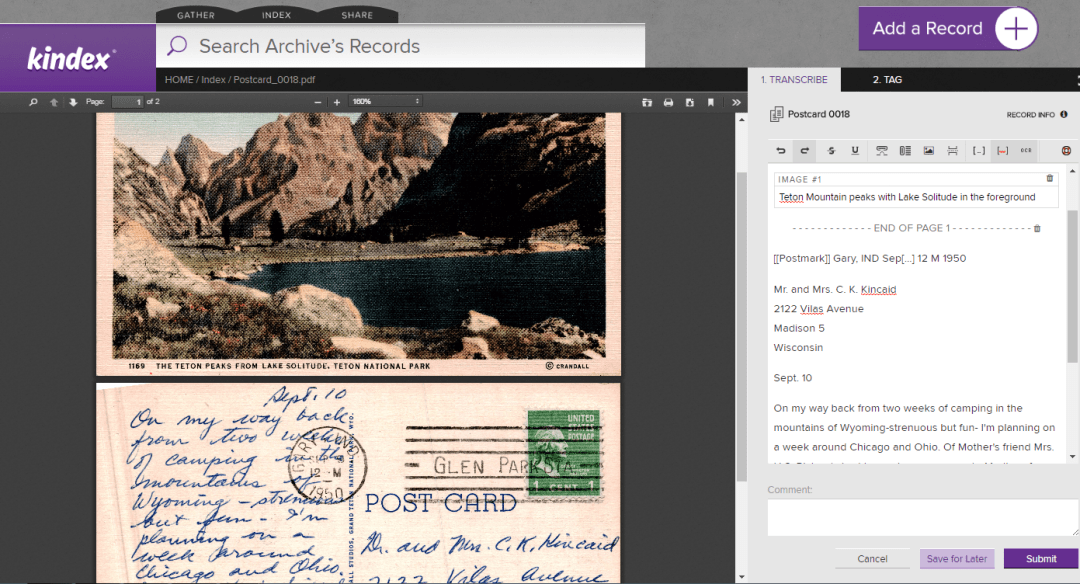
Indexing Postcards
The same guidelines apply when indexing postcards.
Postcard 0016 on found.kindex.org
Note that postcards have additional areas of information, such as postmarks, and captions to images. Because Kindex does not yet have unique indexing fields for each type of data being transcribed, it is helpful to indicate within double brackets [[ ]] the type of information indexed, as shown below:

For Record Owners & Collaborators
If you have been invited to be a collaborator on an archive, you will be able to add records to that archive to be indexed. Please note the following:
- Records added to this archive must have some sort of indexable text that would identify the record to an individual or group.
- Collaborators who add records to Kindex archives retain copyright ownership. By adding records to Kindex, you are grant Kindex a license to host and create a derivative (i.e., an index) of your records.
- Record owners may watermark their images so much as the watermark does not detract from or obscure any part of the record.
- You must follow all Kindex Terms & Conditions. (You have an opportunity to review them when you create a free Kindex account.)
- Kindex has the right to remove records that don’t comply with terms and conditions.
Important: As of 03.28.2017, you can only add one record at a time, but batch upload capabilities are set to be released by April 7th. This tool will also enable you to batch assign Record information such as descriptions and provenance.
Thank you for being a record rescuer!
SIGN UP

by Cathy Gilmore | Mar 16, 2017 | Features, Resources, Software
Announcing the release the Kindex Collaborative Upgrade, the best way to bring family and friends together on a single, online archive. Upgrade to Collaborative and transform your archive into a destination where friends or family can help gather, index, and search—or simply enjoy reading family records.
Also released today is the option to create a Public archive when upgrading to a collaborative account. Enjoy the benefits of Crowdsourced Indexing, and jumpstart your indexing by allowing any Kindex user to transcribe and tag your records. Public archives also help others to discover and connect to your archive.
SIGN UP (more…)
by Cathy Gilmore | Feb 13, 2017 | Uncategorized
What started with a discovery of grandma’s old letters ended with a $25,000 prize for the People’s Choice winners at the 2017 RootsTech Innovators Showdown. For cousins Kimball Clark and Cathy Gilmore, the award represents a heartfelt validation that Kindex®—web software that enables families to archive and index their family records together—is needed by families everywhere.
“This Award is an honor,” Kimball said. “We’ve built something entirely new and innovative that solves a real problem almost every family has: ensuring their precious records can be preserved, shared, and found for generations.” Paul Brooks, CEO of Twile and winners of the same award in 2016, agrees. “In the end, People’s Choice is the award that counts,” he said. In a year that saw customer growth, new product offerings, and a partnership with FindMyPast, Twile has proven its staying power. Kindex expects to be no different.
As self-described record hoarders, Cathy and Kimball share an ambitious goal. “Our mission is to rescue the most at-risk, under-utilized resource in family history: the records in your own home,” said Cathy. Her interest in family history began when she discovered a box of letters written by her Grandma Dorothy Smith Clark. “I thought I knew my grandma,” she said, “but after reading her letters, I saw her in a new light and I wanted to share that with everyone.” That desire to share family records grew into what is now Kindex—indexing software that enables families to “search every word” of their family records. “Letters, journals, video and audio—these personal records have gone largely underutilized by historians and families. It’s time we change that,” said Kimball.
“This is a family business in every way,” Kimball continued. “The more we read our grandma’s records, the more we discovered she had the very same vision—to share family history with everyone. But she lived with limited technology, so we are carrying on her vision in a new way.” Many of Cathy and Kimball’s family members are already catching on. Using Kindex to transcribe and search their own family’s personal records has fostered family unity and provided an easy, inviting gateway to for their family to connect with their ancestors on a more personal level—by reading and searching records written in their own words.
After adding nearly 400 users at RootsTech, Kimball and Cathy are back at work overseeing the development of their collaborative archives and other upcoming features for their almost 800 users. They are also busy with the services arm of Kindex, giving families hands-on help organizing and digitizing their family records. Kindex’s “Record Rescue” service include digitization services and record-gathering events for families. “Gathering and digitizing records is a huge bottleneck for many families,” Cathy said. “These services help families take a huge step forward in getting their records digitized and on a collaborative family archive. On-site scanning events at family reunions are especially successful in unifying records that are scattered among various households.”
To learn more about how Kindex can help you rescue your family records, visit kindex.org and sign up for a free archive.