by Cathy Gilmore | Apr 6, 2017 | Features, Resources, Software
Among the many documents our Grandma Dorothy Clark left behind was a handwritten list of her attempts to be published. She sent articles to church magazines or the Reader’s Digest, but not once were her stories published. As an amateur artist, she never had an exhibit of her art beyond the walls of her own home except the occasional entry at the State Fair. And her letters—including hundreds of handwritten letters to family & friends—sat folded up in boxes for years.

Dorothy Smith in Paul Wildhaber’s art studio in Salt Lake City, Utah, 1932
Her amazing life never made headlines, and was never published. Her records are not found in any special collection, or any other archive devoted to preserving government, academic, or historical records. Her records live on our shelves and closets. But to us she was a leader worth following, and a woman worth remembering. She deserves an archive.
Your Records At Risk
What about your records? Family records represent one of the most at-risk sources of our history. One only has to walk through flea markets and second-hand stores to see the plethora of family records that are discarded. Records that are kept are often scattered among various families, eventually getting lost, damaged, or forgotten.
How will you ensure this doesn’t happen to your records? Do your photos, journals, diaries, letters, and other precious family records deserve an archive? Another way of asking that question is, “Do you deserve to be remembered?”. The answer is, of course “Yes. A thousand times yes.”

Everyone deserves an archive—not just the rich, famous, or important. We all deserve to be remembered.
Searchable Archives for Everyone
When we built Kindex, our goal was to bring amazing archival tools to everyday families. Putting family records on Kindex enables anyone to create a digital archive and access professional tools that make their records more accessible and relevant than ever. Families who manage their own archives on their custom Kindex subdomain can:
- Collaborate with unlimited people to gather records from multiple sources
- Add unlimited records
- Import and add metadata in batch mode (release April 10 2017)
- Utilize crowdsourced indexing tools
- Choose public or private archive access
- Enjoy full text searchability
- Access & download source records and indexed data
Cool. How do I start?


by Cathy Gilmore | Mar 28, 2017 | Features, Resources
A few weeks ago I was browsing in an antique shop when a stack of old photos caught my eye. As I examined these portraits and family poses one by one, I discovered names written on the back: David A. Page. Teddy O. Keefer. Ester Olson. How did they get lost?

Photo 0020 on found.kindex.org is David Alonzo Page with wife Gilheld “Nellie” Qualseth and children Gladys and Elmer, c1900.
As a self-proclaimed hoarder of my own family records, I couldn’t imagine letting go photos like these. And yet it happens every day. Parents pass away, downsize, or move, and family records are lost or thrown away. Records that do remain are often sold in estate sales, eventually finding their way to antique stores or flea markets where they sold as mere commodities.
Kindex wants to change that. While we are doing all we can to rescue records before they are lost, we created the Kindex Lost & Found Archive as a home for records without families to claim them. Found.kindex.org is a destination where collectors, volunteers, researchers, and family members can work together to rescue our histories by preserving, indexing, and discovering lost family records. There are many ways you can be a rescuer—and you don’t have to own any records to get started.
Rescue by Indexing
Rescue history by transcribing photos, postcards, and other records rich with information. Indexing on found.kindex.org creates a new repository of names, dates, and locations that make thousands of records searchable for the first time. All you need to get started is a free Kindex account and a generous heart.
How to index records Kindex Lost & Found Archive.


Postcard 0016 on found.kindex.org
Rescue by Collaborating
Become a collaborator on found.kindex.org and you can add your own collections of “lost” records to be crowdsource indexed. To become a collaborator, contact us for an invite or go to found.kindex.org and click Add a Record.

Rescue by Partnering
If you are an antique collector or dealer you can help rescue history by partnering with Kindex and sharing your records on found.kindex.org. We have partnered with some great local antique shops, including Longwood Antiques and Cobwebs Antiques & Collectibles, who have agreed to allow Kindex to scan photos, postcards, scrapbooks, and other indexable records. We, in turn, have agreed to host them in a crowdsourced indexing archive where the records can be searched for and found by their names, descriptions, keywords, and other metadata—all at no cost to them. Records are attributed to the store they came from, so when they are found, researchers can contact the store owner to inquire about the records.

Who is the cute & mysterious gas station attendant my mother met on the road to Las Vegas in 1959? We’ll learn soon on found.kindex.org.
What’s the Catch?
There’s no catch—just do have a few guidelines:
- Records added to this archive must have some sort of indexable text that would identify the record to an individual or group.
- Collaborators who add records to Kindex archives retain copyright ownership. By adding records to Kindex, you are grant Kindex a license to host and create a derivative (i.e., an index) of your records.
- Record owners may watermark their images so much as the watermark does not detract from or obscure any part of the record.
- You must follow all Kindex Terms & Conditions. You have an opportunity to review them when you create a free Kindex account.
- To index records as a guest, or to add records as an archive collaborator, you must have a Kindex account.
Please contact us with an questions you may have, and happy finding!
SIGN UP

by Cathy Gilmore | Mar 28, 2017 | Featured Archive, Resources, Software
Thanks for being amazing and indexing on found.kindex.org! See the instructions below for indexing records on the Kindex Lost & Found Archive. For a general overview and instructions, see links below.
Getting Started on Lost & Found
SIGN UP
- If you haven’t already, sign up for a Kindex account.
- Note when you sign up on Kindex, you receive your own free archive (up to 50 records) with a custom subdomain.
- After you sign up, navigate to found.kindex.org and choose a record to index.
Note: If you are a collaborator on this archive, you will see the “found” archive in your archives list.
- A purple checkmark means the record has already been indexed, and “transcribe” means it’s ready to be indexed!
Indexing photos
Transcribe & Describe
All photos in found.kindex.org should have some indexable text. Sometimes the text is written on or around the photo, and sometimes it is written on the back. If you need to add any of your own comments or clarification in the transcription, please include it within double brackets [[ ]].
- Type what you see. As with any transcription project, type what you see. Don’t correct spelling, expand abbreviations, or add anything that’s not there (except when using brackets [[ ]] if needed).
- Index a description of the photo. If there is no text on the photo itself, add a description that will help it be more searchable. Add an image description by clicking on the image tool above the transcription window. A numbered image box will appear where you can add your description.

Add an image description by clicking on the image tool above the transcription window.
- Photo captions or descriptions. Add the photo caption or description. If it’s on the next page, be sure to add a page break.

- Studio mark. If there is a studio mark, be sure to include it.

- If you are finished with your transcription, click Submit. Otherwise, click Save for Later.
Tagging & Adding Metadata
After you do the transcription you will go to the Tag step. Here you can additional information that can help this record be sorted and found.
Note: this step is optional. It is not necessary to fill out any or all of this information. To skip or complete this step, click Submit.

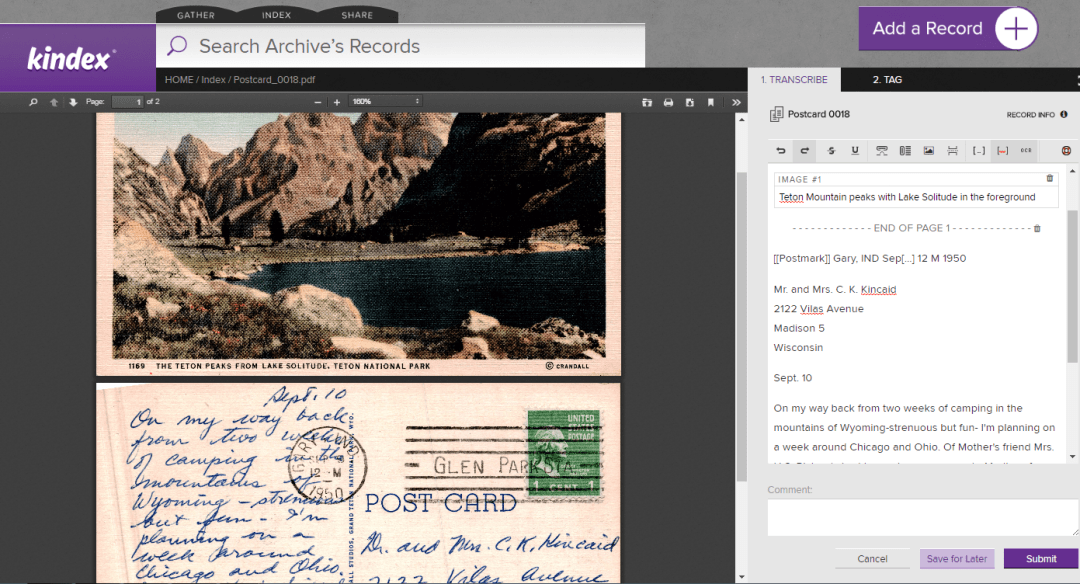
Indexing Postcards
The same guidelines apply when indexing postcards.
Postcard 0016 on found.kindex.org
Note that postcards have additional areas of information, such as postmarks, and captions to images. Because Kindex does not yet have unique indexing fields for each type of data being transcribed, it is helpful to indicate within double brackets [[ ]] the type of information indexed, as shown below:

For Record Owners & Collaborators
If you have been invited to be a collaborator on an archive, you will be able to add records to that archive to be indexed. Please note the following:
- Records added to this archive must have some sort of indexable text that would identify the record to an individual or group.
- Collaborators who add records to Kindex archives retain copyright ownership. By adding records to Kindex, you are grant Kindex a license to host and create a derivative (i.e., an index) of your records.
- Record owners may watermark their images so much as the watermark does not detract from or obscure any part of the record.
- You must follow all Kindex Terms & Conditions. (You have an opportunity to review them when you create a free Kindex account.)
- Kindex has the right to remove records that don’t comply with terms and conditions.
Important: As of 03.28.2017, you can only add one record at a time, but batch upload capabilities are set to be released by April 7th. This tool will also enable you to batch assign Record information such as descriptions and provenance.
Thank you for being a record rescuer!
SIGN UP
by Cathy Gilmore | Mar 25, 2017 | Features, Software
Updated 03.27.2017
March Software Updates:
- Upgrade to a Collaborative Archive to transform your archive into a destination where friends or family can help gather, index, and search—or simply enjoy reading family records. Invite unlimited people at no cost to them.
- Set your Collaborative Archives to public or private.
- Access your archive via your custom subdomain.
- Add an Archive Name and Description to help users identify and learn more about your archive.
- Start a crowdsource indexing by choosing a public collaborative archive. Jumpstart your indexing by allowing any Kindex user to transcribe and tag your records. Public archives also help others to discover and connect to your archive.
- New FAQ Page.
Learn more about Collaborative Archives and Public vs. Private Archives.
SIGN UP
What’s Next:
Guys, we’re pretty excited about these updates coming up next!
- Organize records into collections
- Batch record uploads
- Batch macro data tagging
Updated 02.05.2017
We are excited to announce the Release of Kindex 1.0 at RootsTech 2017. Here’s a rundown of recent software updates, new pricing, and what upcoming features you can look forward to.
Software Updates for the week of February 5th 2017
- Simplified record uploads
- Record tagging (names, dates, places)
- Archive search capabilities
- Kindex user accounts (no FamilySearch login requirement)
- Reserve your archive subdomain
- Simplified FamilySearch Memory imports
- Expanded fields for gathering record data
- New transcription text editor tools
- New Manage Archive tool with payment processing
New RootsTech Pricing
Don’t miss the chance to take advantage of special RootsTech pricing.
- Sign up for a free archive (up to 50 records)
- Add Unlimited records: $10/month
- Add Unlimited + Collaborative: $15/month or $150/year (Pre-Sale only*)
*Subdomains and collaborative features (invite tools and multiple user access to archives) will be available soon. Users will be notified when their subdomains are ready.
What’s Coming Soon
- Batch record uploads
- Access your archive via your custom subdomain
- Invite and collaborate with multiple users in your archive (users access free)
- Organize records into collections
- Write records to FamilySearch
- Improved record type filtering
- Download your complete archive to a CSV file
The Next Big Thing
- Kindex Projects (create custom indexing fields and tags for your archive)
- KinSnap mobile app development
- Custom home pages for collaborative archives
- Organize records into collections
- Earn indexing credits and pay less for your subscription
- Kindex-sponsored record gathering events
- Integration on FamilySearch.org
New Pages

by Cathy Gilmore | Mar 16, 2017 | Features, Resources, Software
Announcing the release the Kindex Collaborative Upgrade, the best way to bring family and friends together on a single, online archive. Upgrade to Collaborative and transform your archive into a destination where friends or family can help gather, index, and search—or simply enjoy reading family records.
Also released today is the option to create a Public archive when upgrading to a collaborative account. Enjoy the benefits of Crowdsourced Indexing, and jumpstart your indexing by allowing any Kindex user to transcribe and tag your records. Public archives also help others to discover and connect to your archive.
SIGN UP (more…)