by Cathy Gilmore | Feb 12, 2018 | Features, Software
We are excited to announce the release of a major update to Kindex archival software, with several new features that will make creating your searchable family archive faster and easier. We’ve maximized space, improved archive organization, and enhanced record navigation and transcription. Check out the updates below or watch our Kindex Feature Update video.
Organize & Browse Your Archive

- Enjoy an expanded viewing area for your records
- Access tools to add, filter, move, and delete records

- Click a record to view or edit (add a transcription, description, or metadata). Note removal of “Transcribe” on record thumbnail. Purple checkmarks indicate indexing is complete.

- View All Records or Indexed Records

- View your archive record total and indexing progress

Manage Your Collections
- View Collection record totals

- Organize your Collections by using Sub-Collections

- Use collections to filter your record views or search

- Hover over record number to edit or move Collections

View & Transcribe Records

Navigate your Archive
- When a record is open, you can view and edit records consecutively with new new navigation buttons above the record

- The same navigation buttons appear below, along with a Save button

- A button under the transcription shows indexing progress as Complete or In Progress. When a transcription is done, click the “Read it!” link to read the completed transcription

We hope you enjoy this update. Let us know what you think!
SIGN UP OR LOG IN

by Cathy Gilmore | Nov 3, 2017 | Features, Software
If a family record can’t be discovered, searched, or shared, what value is it? How do we rescue our family records and transform them into a family archive that reaches beyond the walls of our own home and into the hearts of countless others?
Engaging our families through searchable archives is our primary mission at Kindex. Check out our five essential steps that add value to records and bring families one step closer to getting face-to-face with their own history.

1. Gather your records for scanning. Take an inventory of what you have, start with a small project (think shoebox-sized), and get scanning.

2. Add your digitized records to an online database. Google and Dropbox are great, but consider tools like Kindex that offer collaborative and indexing tools. After all, what good are digitized records if no one can access or search them?

3. Add metadata to your records. In Kindex, this can be done on-the-fly when uploading records in batch mode, making it quick and easy to get records searchable.

4. Transcribe your records. While you can do this in a word processing program, adding transcriptions in Kindex is easy and keeps the indexed data attached to the original record.

5. Add tags for names, dates, and places. (Note: our tagging tool is temporarily offline while we make some improvements.)

Are you ready to rescue your history?
Get started on Kindex today to take advantage of unlimited records and collaborative tools that will get your records out of the closet and into the hearts of your family everywhere.
SIGN UP OR LOG IN


by Cathy Gilmore | Apr 14, 2017 | Features, Resources, Software
Kindex is excited to announce the release of two major software updates that enable Kindex users to customize and grow their archives in powerful new ways.
1. Add & Organize Records into Collections
Archive owners can now create Collections within their archives to organize their records. With collections, you can organize your records any way you wish. For example, your collections can be named as family names, record types, dates, or subjects.

2. Add Multiple Records & Assign Record Info (Metadata) to a Batch
You may now add multiple records to your archive quickly and easily, with the added benefit of designating Record Info (metadata) to a batch of records. This feature allows users to apply common metadata to an entire batch of records, instead of applying metadata individually. Metadata may include Record Info such as descriptions, provenance, dates, places, and keywords. Metadata can also be added and edited in batch form from your archive’s Gather page.
Step 1: To add multiple records, click “Add Records”, and select “Upload from my computer”.


Step 2: Select your records. If you don’t know how to select multiple files at once from your computer, hover atop the link “How to Batch Upload”.

Step 3: Assign your batch of records to a collection, or add a new collection for them to be placed, and review your upload progress. At this point, you may opt to add Record Info (metadata) as a batch now, or individually later.

Step 4: Add Record Info to your records.

What’s Next?
The following enhancements are currently in development and will be released soon:
- Manually order your Collections
- Nest a Collection within a Collection
Upgrade Now
If you don’t already have an Unlimited + Collaborative Kindex Archive, now is the time to upgrade and take advantage of these amazing tools. Please contact us with an questions you may have, and happy batching!
SIGN UP OR LOG IN

by Cathy Gilmore | Mar 28, 2017 | Featured Archive, Resources, Software
Thanks for being amazing and indexing on found.kindex.org! See the instructions below for indexing records on the Kindex Lost & Found Archive. For a general overview and instructions, see links below.
Getting Started on Lost & Found
SIGN UP
- If you haven’t already, sign up for a Kindex account.
- Note when you sign up on Kindex, you receive your own free archive (up to 50 records) with a custom subdomain.
- After you sign up, navigate to found.kindex.org and choose a record to index.
Note: If you are a collaborator on this archive, you will see the “found” archive in your archives list.
- A purple checkmark means the record has already been indexed, and “transcribe” means it’s ready to be indexed!
Indexing photos
Transcribe & Describe
All photos in found.kindex.org should have some indexable text. Sometimes the text is written on or around the photo, and sometimes it is written on the back. If you need to add any of your own comments or clarification in the transcription, please include it within double brackets [[ ]].
- Type what you see. As with any transcription project, type what you see. Don’t correct spelling, expand abbreviations, or add anything that’s not there (except when using brackets [[ ]] if needed).
- Index a description of the photo. If there is no text on the photo itself, add a description that will help it be more searchable. Add an image description by clicking on the image tool above the transcription window. A numbered image box will appear where you can add your description.

Add an image description by clicking on the image tool above the transcription window.
- Photo captions or descriptions. Add the photo caption or description. If it’s on the next page, be sure to add a page break.

- Studio mark. If there is a studio mark, be sure to include it.

- If you are finished with your transcription, click Submit. Otherwise, click Save for Later.
Tagging & Adding Metadata
After you do the transcription you will go to the Tag step. Here you can additional information that can help this record be sorted and found.
Note: this step is optional. It is not necessary to fill out any or all of this information. To skip or complete this step, click Submit.

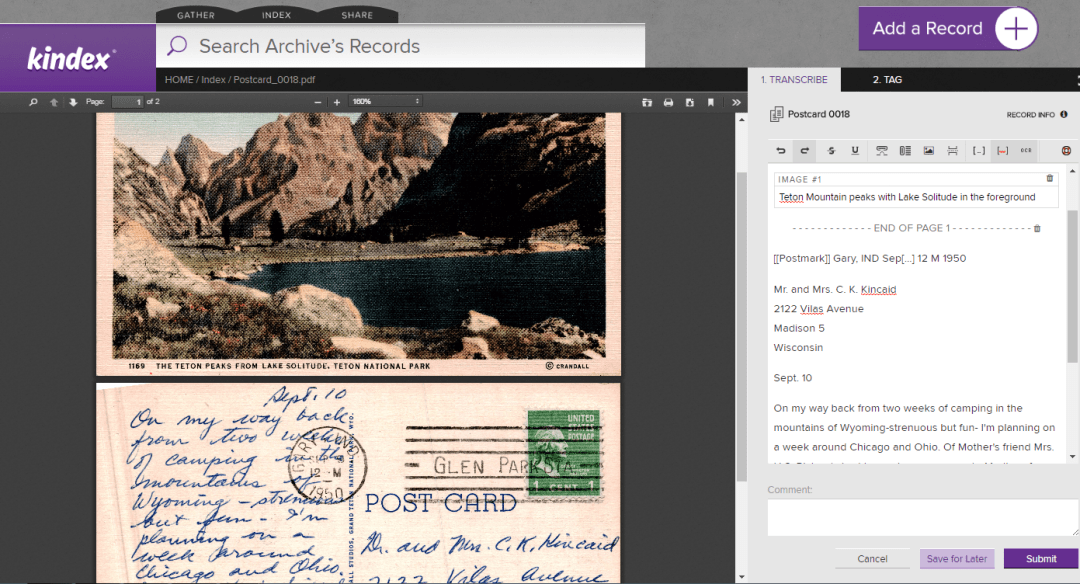
Indexing Postcards
The same guidelines apply when indexing postcards.

Postcard 0016 on found.kindex.org
Note that postcards have additional areas of information, such as postmarks, and captions to images. Because Kindex does not yet have unique indexing fields for each type of data being transcribed, it is helpful to indicate within double brackets [[ ]] the type of information indexed, as shown below:

For Record Owners & Collaborators
If you have been invited to be a collaborator on an archive, you will be able to add records to that archive to be indexed. Please note the following:
- Records added to this archive must have some sort of indexable text that would identify the record to an individual or group.
- Collaborators who add records to Kindex archives retain copyright ownership. By adding records to Kindex, you are grant Kindex a license to host and create a derivative (i.e., an index) of your records.
- Record owners may watermark their images so much as the watermark does not detract from or obscure any part of the record.
- You must follow all Kindex Terms & Conditions. (You have an opportunity to review them when you create a free Kindex account.)
- Kindex has the right to remove records that don’t comply with terms and conditions.
Important: As of 03.28.2017, you can only add one record at a time, but batch upload capabilities are set to be released by April 7th. This tool will also enable you to batch assign Record information such as descriptions and provenance.
Thank you for being a record rescuer!
SIGN UP
by Cathy Gilmore | Mar 25, 2017 | Features, Software
Updated 03.27.2017
March Software Updates:
- Upgrade to a Collaborative Archive to transform your archive into a destination where friends or family can help gather, index, and search—or simply enjoy reading family records. Invite unlimited people at no cost to them.
- Set your Collaborative Archives to public or private.
- Access your archive via your custom subdomain.
- Add an Archive Name and Description to help users identify and learn more about your archive.
- Start a crowdsource indexing by choosing a public collaborative archive. Jumpstart your indexing by allowing any Kindex user to transcribe and tag your records. Public archives also help others to discover and connect to your archive.
- New FAQ Page.
Learn more about Collaborative Archives and Public vs. Private Archives.
SIGN UP
What’s Next:
Guys, we’re pretty excited about these updates coming up next!
- Organize records into collections
- Batch record uploads
- Batch macro data tagging
Updated 02.05.2017
We are excited to announce the Release of Kindex 1.0 at RootsTech 2017. Here’s a rundown of recent software updates, new pricing, and what upcoming features you can look forward to.
Software Updates for the week of February 5th 2017
- Simplified record uploads
- Record tagging (names, dates, places)
- Archive search capabilities
- Kindex user accounts (no FamilySearch login requirement)
- Reserve your archive subdomain
- Simplified FamilySearch Memory imports
- Expanded fields for gathering record data
- New transcription text editor tools
- New Manage Archive tool with payment processing
New RootsTech Pricing
Don’t miss the chance to take advantage of special RootsTech pricing.
- Sign up for a free archive (up to 50 records)
- Add Unlimited records: $10/month
- Add Unlimited + Collaborative: $15/month or $150/year (Pre-Sale only*)
*Subdomains and collaborative features (invite tools and multiple user access to archives) will be available soon. Users will be notified when their subdomains are ready.
What’s Coming Soon
- Batch record uploads
- Access your archive via your custom subdomain
- Invite and collaborate with multiple users in your archive (users access free)
- Organize records into collections
- Write records to FamilySearch
- Improved record type filtering
- Download your complete archive to a CSV file
The Next Big Thing
- Kindex Projects (create custom indexing fields and tags for your archive)
- KinSnap mobile app development
- Custom home pages for collaborative archives
- Organize records into collections
- Earn indexing credits and pay less for your subscription
- Kindex-sponsored record gathering events
- Integration on FamilySearch.org
New Pages