by Cathy Gilmore | Apr 17, 2017 | Features
Have you planned your family reunion yet? If you’ve ever attended a reunion, you know how much work goes into publicity, venues, games, t-shirts, and of course, food. In all this planning, it’s easy to lose sight of one key event you should implement at your next reunion: a “Record Rescue”. A Kindex Record Rescue is an all-inclusive way for families to gather, preserve, and share their family records.
It begins with inviting Kindex to your next family gathering to scan your records, and ultimately ends with family records united on a searchable, shareable family archive. The end product is a Kindex family archive where family members can gather, index, and search every word of records once hidden in closets and on shelves.
Learn more: A Sampson Family Record Rescue
Whether your small, grandparent family organization (GFO) or a large ancestral family organization (AFO), ask yourself the following questions :
- Do you know where all your family records are?
- Are all your family records scanned?
- Do you have a long-term plan for protecting and preserving your family’s physical records?
- Does your family have a way for all its members to access to their records?
- Are your family records indexed and searchable?
- Do you know exactly what will happen to your family records when you pass away?
If you answered “no” to any of those questions, it’s time for a Record Rescue. Family reunions provide a rare opportunity for families to gather and scan family records, as well as discuss how they can ensure their records will be preserved and accessible. Families can:
- Unite far-flung records by inviting family members to bring their photos, letters, and journals
- Discover and view precious family records for the first time
- Inventory family records including ownership, record types, and provenance.
- Learn how to handle, organize, scan, and index their records
Kindex is passionate about family records, and we want to help you rescue the most at-risk, precious source of your family’s history: your own family records. Contact us to learn more and reserve your family reunion date.
Learn how Kindex helped the Sampson Family Organization rescue their family reunions.
START MY RECORD RESCUE


by Cathy Gilmore | Apr 17, 2017 | Featured Archive, Stories from the Archive
One family organization—the Sampsons of Delta, Utah—embraced the idea of record gathering and digitization. When reunion organizer Tonna Bounds first approached friend and Kindex owner Kimball Clark, she had a great vision of uniting her family records, but was concerned about the following obstacles:
- How to encourage family members throughout the country to attend the reunion and bring their records
- How to scan records correctly within a limited timeframe
- How to discern which family members had what records
- Convincing aging or skeptical family members to preserve and share their records
- Involve children and youth in family record archiving
With her family’s biannual reunion several months away, we suggested she use Kindex Gather Services to hold an on-site digitization event—a “family scanning party”.
Preparation
Several weeks before the reunion, we sent the family a “Call for Records” publicity image to promote the digitization event. The family posted this image on social media and emailed this image to family, and provided guidelines on record gathering including:
- A list of family members in attendance, and who of those brought records
- How record scanning would be prioritized. For example, the Sampson family focused on letters, journals, and papers more than photos. They also gave higher priority to records coming in from out-of-town attendees, and those records belonging to first-generation family members.)
- Acceptable record sizes, and what types of scanners would be available to accommodate those sizes
- Suggestions on preparing items for scanning, including the removal of loose papers, staples, paper clips, sheet protectors, etc.

Execution
When family members with records arrived at the reunion, we checked in their records and gathered the following information:
- Record owner and contact information
- Primary person to whom the records originally belonged
- Inventory of items to be scanned
As more documents arrived throughout the day, we were impressed with the family’s response to the Call for Records. Records were gathered from New York, Colorado, Arizona, and Utah. Soon all our scanners were busy, and several family volunteers—including several youth—jumped in to help. Throughout the reunion, families entered the “record room” to check on the status of their scanning. They were delighted to see the process, and several volunteered their time to move the process along.

Mark Sampson, Kimball Clark, Dale Sampson, and Caleb Sampson busy scanning their family records. Caleb remarked, while scanning the journals of his ancestors: “This makes me want to go write in my journal when I get home.”

Ikara Bounds scans her family records while Kimball trains Caleb Sampson on book scanning

A Sampson family member pauses scanning to review an old school photo of an ancestor.
Follow Up
At the end of the day, we returned the records to their owners, and made arrangements to scan any records that remained. Following the compilation of all digitized files to an external hard drive, Kindex will:
- Orient each scan
- Save each in the appropriate format and grouping.
- Transfer the complete digitized archive to USB drives for family members to order
- Upload all digitized records to sampson.kindex.org, which enables the family to access each record and begin the indexing process.
Because of the Sampson Family’s dedication to the preservation and and sharing of their family records, their scanning event was a great success. Family members couldn’t wait to access records they had never seen, and were already planning indexing and book projects. Several volunteers became emotional as they paused to read journal entries between scans, pored over old photos, and when a copy of the Delta High School fight song was discovered, played an impromptu version of on the piano. Others simply poked in their heads and exclaimed, “Wonderful! We can’t wait!”
After the reunion, we asked Tonna how she felt about the record-gathering effort. She said:
“How do you explain something that took place at our past reunion that is so futuristic in thought and action. People don’t understand the potential in all of this—jaw dropping in thought!! Just trying to wrap my brain around it all. Aunt Zelda and Uncle Ivo’s history has been destroyed and through all the ancestors’ history. Those lost histories can now be put back together with even more force then could be imagined.”

The Sampson Family prepares letters for scanning.
We were honored to be a part of the Sampson Family’s effort to bring their family records out of obscurity, and hope to enable many more families see the the potential in utilizing family reunions for the gathering and preservation of their own family records.
Contact us to learn more about how Kindex can help you rescue your family records.

by Cathy Gilmore | Apr 6, 2017 | Features, Resources, Software
Among the many documents our Grandma Dorothy Clark left behind was a handwritten list of her attempts to be published. She sent articles to church magazines or the Reader’s Digest, but not once were her stories published. As an amateur artist, she never had an exhibit of her art beyond the walls of her own home except the occasional entry at the State Fair. And her letters—including hundreds of handwritten letters to family & friends—sat folded up in boxes for years.

Dorothy Smith in Paul Wildhaber’s art studio in Salt Lake City, Utah, 1932
Her amazing life never made headlines, and was never published. Her records are not found in any special collection, or any other archive devoted to preserving government, academic, or historical records. Her records live on our shelves and closets. But to us she was a leader worth following, and a woman worth remembering. She deserves an archive.
Your Records At Risk
What about your records? Family records represent one of the most at-risk sources of our history. One only has to walk through flea markets and second-hand stores to see the plethora of family records that are discarded. Records that are kept are often scattered among various families, eventually getting lost, damaged, or forgotten.
How will you ensure this doesn’t happen to your records? Do your photos, journals, diaries, letters, and other precious family records deserve an archive? Another way of asking that question is, “Do you deserve to be remembered?”. The answer is, of course “Yes. A thousand times yes.”

Everyone deserves an archive—not just the rich, famous, or important. We all deserve to be remembered.
Searchable Archives for Everyone
When we built Kindex, our goal was to bring amazing archival tools to everyday families. Putting family records on Kindex enables anyone to create a digital archive and access professional tools that make their records more accessible and relevant than ever. Families who manage their own archives on their custom Kindex subdomain can:
- Collaborate with unlimited people to gather records from multiple sources
- Add unlimited records
- Import and add metadata in batch mode (release April 10 2017)
- Utilize crowdsourced indexing tools
- Choose public or private archive access
- Enjoy full text searchability
- Access & download source records and indexed data
Cool. How do I start?


by Cathy Gilmore | Mar 28, 2017 | Featured Archive, Resources, Software
Thanks for being amazing and indexing on found.kindex.org! See the instructions below for indexing records on the Kindex Lost & Found Archive. For a general overview and instructions, see links below.
Getting Started on Lost & Found
SIGN UP
- If you haven’t already, sign up for a Kindex account.
- Note when you sign up on Kindex, you receive your own free archive (up to 50 records) with a custom subdomain.
- After you sign up, navigate to found.kindex.org and choose a record to index.
Note: If you are a collaborator on this archive, you will see the “found” archive in your archives list.
- A purple checkmark means the record has already been indexed, and “transcribe” means it’s ready to be indexed!
Indexing photos
Transcribe & Describe
All photos in found.kindex.org should have some indexable text. Sometimes the text is written on or around the photo, and sometimes it is written on the back. If you need to add any of your own comments or clarification in the transcription, please include it within double brackets [[ ]].
- Type what you see. As with any transcription project, type what you see. Don’t correct spelling, expand abbreviations, or add anything that’s not there (except when using brackets [[ ]] if needed).
- Index a description of the photo. If there is no text on the photo itself, add a description that will help it be more searchable. Add an image description by clicking on the image tool above the transcription window. A numbered image box will appear where you can add your description.

Add an image description by clicking on the image tool above the transcription window.
- Photo captions or descriptions. Add the photo caption or description. If it’s on the next page, be sure to add a page break.

- Studio mark. If there is a studio mark, be sure to include it.

- If you are finished with your transcription, click Submit. Otherwise, click Save for Later.
Tagging & Adding Metadata
After you do the transcription you will go to the Tag step. Here you can additional information that can help this record be sorted and found.
Note: this step is optional. It is not necessary to fill out any or all of this information. To skip or complete this step, click Submit.

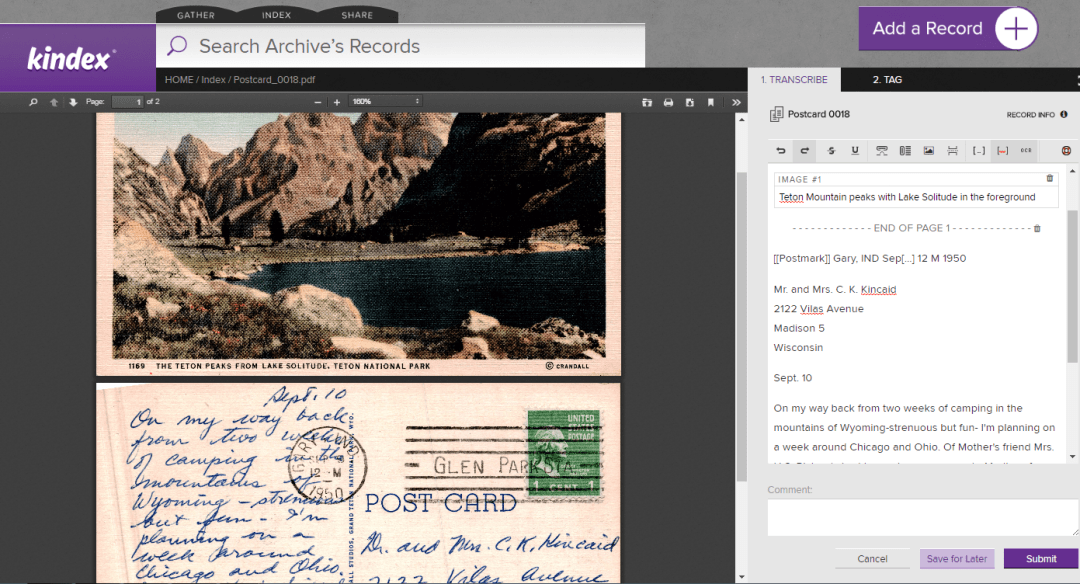
Indexing Postcards
The same guidelines apply when indexing postcards.

Postcard 0016 on found.kindex.org
Note that postcards have additional areas of information, such as postmarks, and captions to images. Because Kindex does not yet have unique indexing fields for each type of data being transcribed, it is helpful to indicate within double brackets [[ ]] the type of information indexed, as shown below:

For Record Owners & Collaborators
If you have been invited to be a collaborator on an archive, you will be able to add records to that archive to be indexed. Please note the following:
- Records added to this archive must have some sort of indexable text that would identify the record to an individual or group.
- Collaborators who add records to Kindex archives retain copyright ownership. By adding records to Kindex, you are grant Kindex a license to host and create a derivative (i.e., an index) of your records.
- Record owners may watermark their images so much as the watermark does not detract from or obscure any part of the record.
- You must follow all Kindex Terms & Conditions. (You have an opportunity to review them when you create a free Kindex account.)
- Kindex has the right to remove records that don’t comply with terms and conditions.
Important: As of 03.28.2017, you can only add one record at a time, but batch upload capabilities are set to be released by April 7th. This tool will also enable you to batch assign Record information such as descriptions and provenance.
Thank you for being a record rescuer!
SIGN UP

by Cathy Gilmore | Jan 8, 2017 | Features
Do you wish there was a better way to archive and search your family’s letters, journals, and photos? Are you still using a combination of spreadsheets, PDFs, and word processing tools to transcribe your family history records? For Archive Awareness Week, we are reprising our top ten reasons why we love Kindex.
- We’ve got SaaS. Kindex is web software containing tools to help you archive and index, and search your digital records. There is no software to install, just go to kindex.org and create an account.

- We ❤ hoarders. We all know the feeling. Someone in your family wants to borrow the priceless family record you’ve kept in your home for years? Hard pass. Rather than wait until they pry it from your cold, dead hands, why not digitize those records and put them on Kindex? You can make your archive public or private, and invite others to view and index. So, whether your a record-keeper, a record-hoarder, or you’re a downright record-hider, Kindex helps you share your precious family records without the risk of your great-nephew spilling his Starbucks on your grandfather’s journal. And, you can learn what’s been hiding in Aunt Sue’s closet all these years (well, besides those bell-bottoms).

- We have layers. With Kindex you can add layers of searchable data to your records. We move beyond titles and descriptions to include valuable data points such as record provenance, transcription, keywords, date, place, and addtional tags.

- Share the love. Are you the family historian that gets stuck with all the work? Not anymore. Create a Kindex Family archive and share your records (and the indexing work) with anyone. Get your family and friends involved, and they might learn why you’re so crazy about your ancestors. Or just why you’re crazy. Still, they may be inspired to add a few records of their own to share with you, so it’s a win-win.

- Thanks for the Memories. Kindex is integrated with FamilySearch, which means you can import the Memories you’ve added to FamilySearch into Kindex and make them searchable with our indexing tools. In the coming weeks we’ll also have the ability to share Kindex records back to FamilySearch. That means all the people you tagged with FamilySearch IDs in your record transcriptions? They’ll get shared with those people on FamilySearch.
- Be a rescuer. Having a well-preserved letter, journal, or diary of an ancestor is at the top of many people’s wish list. Kindex offers families the ability to grant this wish by helping gather, index, and share records that would otherwise be lost, damaged, or thrown away. Rescue your family records on Kindex—your descendants will thank you.

- Search your way. Tired of searching huge genealogy databases and getting too many (or not enough) results? With Kindex you can create personal or family archives containing just the records you want, so you get the search results you want.

- Like, settle down with the family history. We get it. You would rather research Alexander Hamilton, or bugs, or Roald Dahl? You can use Kindex to archive, index, and research any topic. Put your documents on Kindex, and start indexing. Just make sure you’re the record holder, or you have permission to upload and index that record.
- You’re special, but not special enough to have your own indexing software. Some archives are lucky — they have their own custom indexing software. But if you’re not the Smithsonian or National Archives, it doesn’t mean you’re stuck doing the old Spreadsheet/Microsoft Word/PDF tango. Are you an archivist, historian, researcher, or librarian who needs a custom solution for indexing a collection? Kindex Projects, due to be released in Spring 2017, will support records that require custom indexing fields, multiple download formats, and privacy options.
- Kids these days. It’s been said that kids nowadays don’t read—they search. By offering a searchable database of family records, Kindex provides a familiar and fun gateway for people to enter and learn quickly about their ancestor. Then, after they read an indexed record, they may be inspired to jump in and index one themselves. The feeling you get when you read and transcribe a record your ancestor kept is one we hope everyone feels—especially our kids.